




Template 8160 Avery | 8160 Avery Template
Editable Canva Label Template – Avery L7160 / J8160 Compatible | 63.5 × 38.1 mm | 2.5 × 1.5 in | A4 Label Sheet
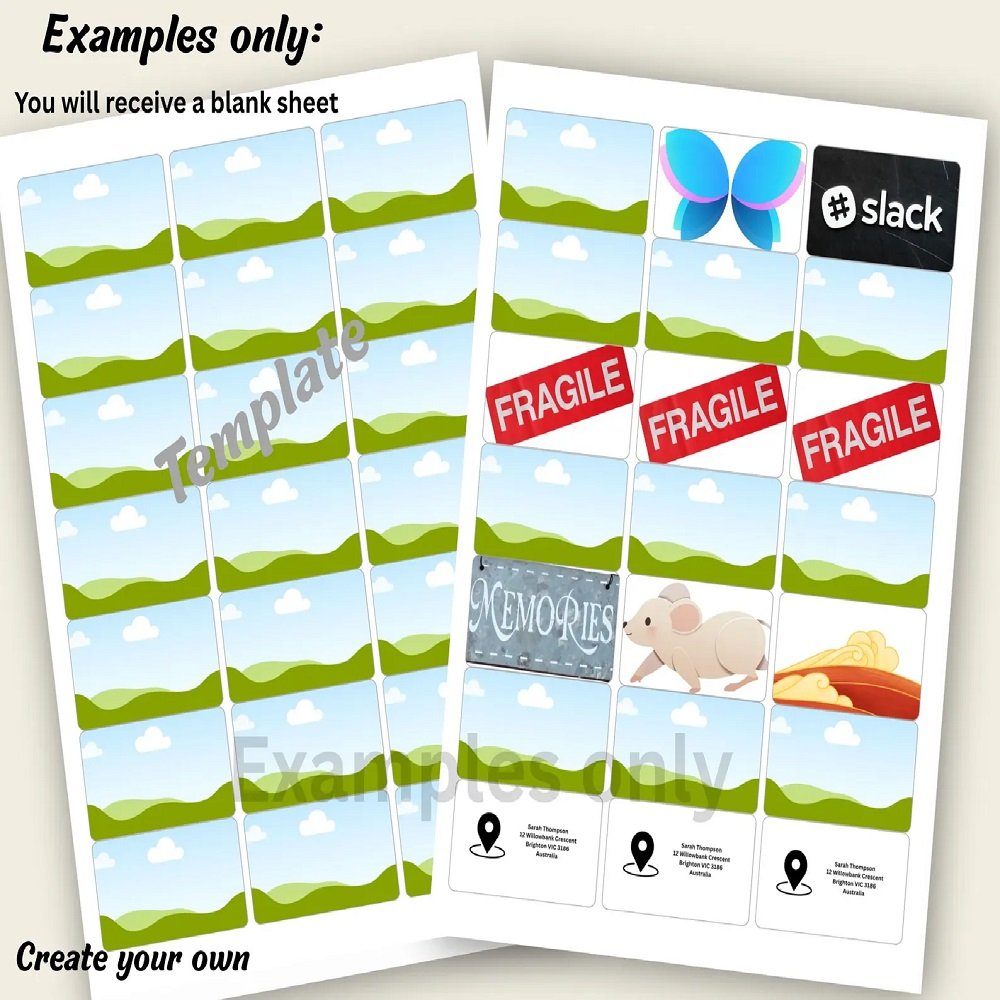
Create professional, beautifully organized labels with this Editable Canva Label Template, designed for A4 label sheets featuring 21 labels per page. With an easy-to-use layout, pre-aligned frames, and a convenient bonus single-label editor, this template makes designing and preparing your labels simple—even if you have limited design experience.
Whether you're building a small business brand, packaging handmade products, organizing your pantry, preparing address labels, or creating custom craft supplies, this versatile Canva template gives you a flexible foundation that you can personalize to suit your needs.
✦ LABEL SIZE & LAYOUT
Each individual label measures:
63.5 × 38.1 mm
2.5 × 1.5 inches
The sheet contains:
21 labels per A4 page
3 columns × 7 rows
The layout is carefully arranged to help maintain consistent spacing and positioning when preparing your designs for printing.
✦ WHAT'S INCLUDED
1. BLANK LABEL SHEET
A clean, editable label sheet designed for creating your own custom designs.
Includes:
• 21 empty label spaces
• 3-column × 7-row arrangement
• Outline-only design
• Editable Canva layout
• Space for your own text, graphics, logos, and branding
This option is ideal if you want complete creative control over the appearance of your labels.
2. LABEL SHEET WITH IMAGE FRAMES
This version includes 21 pre-aligned drop-in image frames.
Simply place your images, logos, illustrations, artwork, or patterns into the frames and Canva will help keep your content positioned within the designated areas.
Perfect for:
• Business logos
• Product images
• Brand artwork
• Decorative patterns
• Illustrations
• Product labels
• Personalized graphics
The organized layout helps make designing multiple labels faster and more consistent.
3. BONUS – FULL-SIZE SINGLE LABEL EDITOR
As an added bonus, you'll receive a full-size single-label editing template.
Instead of designing directly on the complete sheet, you can create one label at a larger working size. This makes it easier to:
• Position text accurately
• Resize images
• Arrange logos
• Create detailed designs
• Adjust spacing
• Experiment with fonts and graphics
Once your individual label design is complete, you can use it as the basis for your sheet layout.
✦ AVERY COMPATIBILITY
This template is designed around the dimensions of compatible A4 label sheets measuring 63.5 × 38.1 mm (2.5 × 1.5 inches).
Compatible Avery formats include:
🇦🇺 Australia: Avery L7160
🇬🇧 United Kingdom: Avery J8160
🇪🇺 Europe: J8160 / L7160
🌎 International: Any A4 label sheet using the same 63.5 × 38.1 mm label dimensions and 21-label-per-sheet arrangement.
🇺🇸 NOTE FOR USA USERS
Many US Avery products use US Letter rather than A4 paper size. This particular template is designed for A4 paper.
When printing, select:
Paper Size: A4
Scale: 100% / Actual Size
Scaling: Do not use “Fit to Page”
Always check your specific label sheet dimensions before printing.
✦ EASY CANVA EDITING
No advanced graphic design software is required.
Canva provides a simple interface that allows you to customize your labels with your own:
• Text
• Fonts
• Colors
• Logos
• Images
• Graphics
• Patterns
• Brand elements
Create labels that match your business identity or personal style without needing to build the layout from scratch.
✦ HOW TO USE
Using your template is simple:
STEP 1 – Purchase
Complete your Etsy checkout.
STEP 2 – Download
Download the PDF provided with your purchase.
STEP 3 – Access Canva
Open the PDF and click the Canva template access link.
STEP 4 – Customize
Open the template in Canva and personalize your labels with your own text, images, logos, colors, and designs.
STEP 5 – Export
When your design is finished, download it as PDF Print.
STEP 6 – Print
Print onto your compatible A4 label sheets using 100% / Actual Size.
STEP 7 – Test First
Before printing on adhesive labels, print a test page on ordinary paper. Place it over your label sheet or hold it against the sheet to check alignment.
✦ PERFECT FOR SMALL BUSINESSES
These customizable labels are especially useful for entrepreneurs and small business owners who want their packaging to look consistent and professional.
Use them for:
📦 Product packaging
🏷️ Brand and business labels
🛍️ Retail products
🎁 Handmade products
🧴 Beauty and personal-care packaging
🍯 Jars and containers
🕯️ Candles and handmade goods
📬 Address and mailing labels
📇 Product information labels
🌿 Ingredient labels
🧺 Pantry organization
🎨 Craft projects
🎀 Gift packaging
The possibilities are flexible—simply customize the design to match your project.
✦ WHY CHOOSE THIS TEMPLATE?
Save Time
Skip the process of creating a 21-label layout from scratch.
Easy to Customize
Edit your labels directly in Canva using familiar design tools.
Professional Results
Keep your labels consistent across an entire sheet.
Flexible Design
Add your own branding, text, images, and colors.
Convenient Bonus
The included single-label editor makes detailed designing easier.
Reusable
Customize the template for different products and projects according to the applicable license terms.
✦ IMPORTANT PRINTING INFORMATION
For the best results:
• Use A4 paper
• Select 100% or Actual Size when printing
• Disable “Fit to Page” or automatic scaling
• Check your printer settings before printing
• Test alignment on plain paper first
• Confirm your label sheet dimensions before purchase
Printer settings, paper handling, margins, and printer tolerances can affect final alignment.
✦ IMPORTANT – DIGITAL PRODUCT
This listing is for a DIGITAL CANVA TEMPLATE.
You will receive a PDF containing the Canva access link.
You will NOT receive:
❌ Physical labels
❌ Printed materials
❌ Pre-printed stickers
❌ A physical package
Nothing will be mailed to you.
✦ CANVA REQUIREMENT
You will need access to Canva to edit the template.
Basic knowledge of Canva is recommended. You should be comfortable adding text, replacing images, changing colors, and downloading your finished design.
Please check the Canva features or account requirements applicable to your account before purchasing.
✦ PLEASE READ BEFORE PURCHASING
This template is designed to match the stated label dimensions, but individual printers and label manufacturers may have slight variations.
Please verify that your physical label sheets measure 63.5 × 38.1 mm (2.5 × 1.5 inches) and contain 21 labels on an A4 sheet before printing.
A test print on plain paper is strongly recommended.
✦ COPYRIGHT & TERMS OF USE
This is a digital design template intended for the purchaser's personal or business use according to the applicable license terms.
You may customize the template for your own projects and business needs.
You may not resell, redistribute, share, reproduce, upload, or give away the original editable Canva template or access link as a standalone product.
✦ CREATE PROFESSIONAL LABELS WITH EASE
Save time and create polished, consistent labels without starting from a blank page.
With 21 pre-aligned labels, an image-frame version, and a bonus full-size single-label editor, this Canva template gives you everything you need to start creating customized labels for your business, home organization, packaging, and craft projects.
Design it. Customize it. Print it. Label it.


Reviews
There are no reviews yet.